One task of the closing procedure is the balance carryforward. It takes care of transferring ending balances from the current financial year accounts to the opening balances of the next financial year accounts. This is done for all accounts of the balance sheet. Expense and Income accounts are not carry forwared to the same account of next year, but transferred to the “retained earnings” account, and therefore they start with zero balance in the year.
In SAP, both types of accounts are processed by the carry forward process and the balance of an account is transferred to the same or to another specific account depending on the account type.
- For “Balance Sheet” account type, the balance of the account is carried forward to the same account.
- For “Primary Cost or Revenue” account type, the balance of the account, which appears in the income statement (P&L), is carried forward to a “Retained Earnings Account”, which is a G/L account of type “Balance Sheet”.
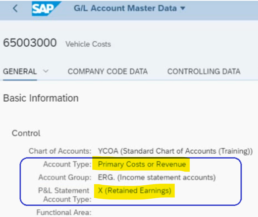
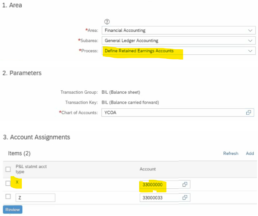
The G/L account assigned to this “Retained Earnings Account” can be modified with the “Automatic Account Determination” app. This app replaces the old OB53 transaction. You can create additional P&L Statement account types besides the “X – Retained Earnings”, with another G/L account for transferring its balance.
Check the app settings:

 English