Within the purchase-to-pay process, when goods have been ordered, there’s a process that involves matching the invoices received to the corresponding purchase order and goods receipt. This is called GR-IR.
1. Steps within the Purchase-to-Pay process #
In the Purchase-to-Pay process we have this scenario:
1. Purchase Order creation, requesting for goods or stock material.
2. Goods Receipt (MIGO).
In MM, the inventory is updated with a material document.
In FI a journal document is posted:

3. Incoming invoice (MIRO).
In MM the vendor invoice is posted, and in FI the following jurnal document is posted:

4. Outgoing Payment

5. Electronic Bank Statement

2. GR-IR Reconciliation #
The system clears the items if the quantities and prices for the GR matches those in the IR. If not, they remain open and need to be processed separately.
Situations that prevent the automatic reconciliation:
- IR or GR is missing.
- Amounts/quantities do not match.
- PO item has an outdated price.
- Wrong GR/IR clearing account.
The GR/IR reconciliation process is a highly manual process that delays the period-end closing. To improve this process use these apps:
- “Intelligent GR/IR Account Reconciliation” app.
- “Monitor GR/IR Account Reconciliation” app.
3. Repost GR-IR Clearing app #
The “Repost Gr-IR clearing” app is a special program that analyzes the balance sheet for the “Good Receipt Clearing” account, at PO item level, to check if its balance is zero, and to post a correction with the balance amount as an asset or a liability.
This analysis is done at the end of each period (monthly), as part of the closing activities. The correction is posted in a BI session, and reversed the first day of the next period.
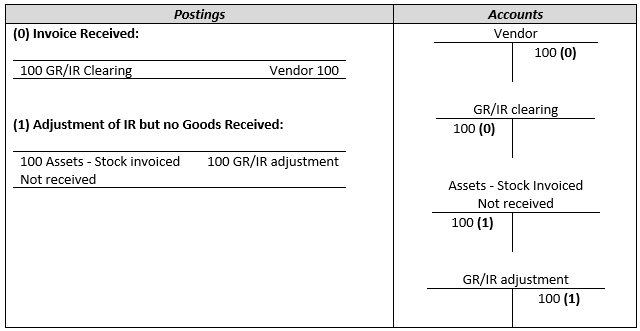
Asset situation #
The Asset Situation is a Debit Balance in GR/IR Clearing Account (IR without GR). This means that receivables from the vendor are still expected.
 #
#
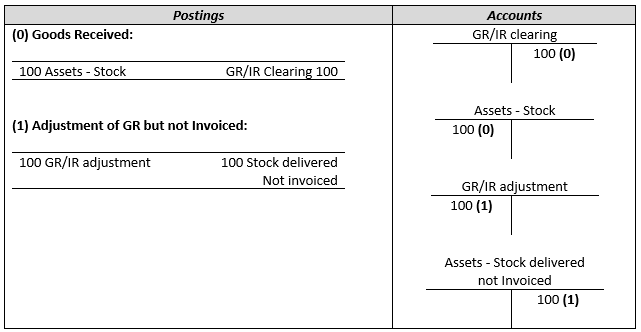
Liability situation #
The Liability situation is a Credit Balance in GR/IR Clearing Account (GR without IR). This means the Invoice is not yet received.
4. Related transactions and apps #
- The “Repost GR-IR clearing” app.
- MR11 Transaction (similar to the app)
- F.19 Transaction. (don’t treat F.19 as a substitute for actually clearing GR/IR. It’s cosmetic — it makes the balance sheet look right at period-end, but the underlying open items are still there.)

 English