Companies receive the bank statement with the transactions of their bank accounts. These transactions are usually posted using the electronic bank statement (EBS), specially when the company works with many bank accounts or receives a large bank statements daily.
Although it’s not common, SAP provides a way of posting these transactions manually, using the transaction FF67 (manual entry of bank statement), so that the accountant can enter the data of the bank statement.
These transactions require a previous customizing in order to be posted to a G/L account.
1. Related Customizing #
Prior posting the manual bank statement you need to define the transactions that the user will be able to enter, their posting rules and related G/L accounts. You can also define variants to decide which fields will be available when entering data into the bank statement.
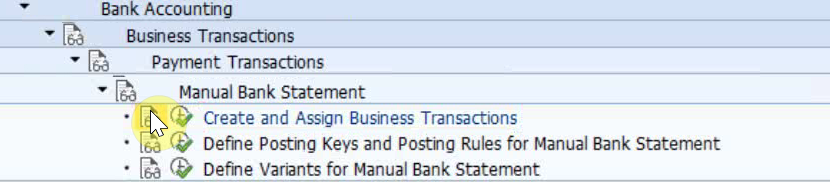
The postings defined in customizing can also post to subledger accounts (customer or vendor account), but this is not common.
2. Examples #
Outgoing payment example: First you post the vendor invoice received. Later, when the company issues the payment you post it. A day or two days later, the bank statement comes to acknowledge that money was really transferred from the bank account, and consequently the reconciliation of that payment is achieved.
Incoming payment example: First the company issues a customer invoice. Later, on invoice due date, the company post the incoming payment from the customer. A day or two days later, the bank statement comes to acknowledge that the money was really received, and therefore, the reconciliation is achieved.
Some other examples of bank statement transactions could be bank charges, or reversals of other transactions.
3. Further details #
Watch the following video to have a better insight of the manual bank statement.
4. Related transactions and apps #
| Transaction / App | Description |
|---|---|
| FF67 | Manual Bank Statement |
| F.13 | Automatic clearing |

 English