The controlling area is the most important organizational element in controlling. You will use different controlling areas to divide the entire group from a cost accounting standpoint.
Each controlling area represents a separate unit for which you can manage, allocate and calculate cost and revenue.
1. Important decission #
Depending on the landscape of the organization, there must be some deliberations in order to decide which controlling areas might be needed. This might impose some restrictions in controlling, because if you create 1 controlling area per company, then you won’t be able to manage and calculate costs cross-company.
Note that when in this document we mention the “company”, we really mean the “company code“.
Once the decision is taken, It’s hard to change, so it needs a careful thought. Prior to making a decision, you might consider the organizational environment, as well as the processes in logistics and accounting.
1.1. Possible approaches #
There are 3 approaches:
- A controlling area per company. (FI view = CO view)
- A global cross-company controlling area.
- A hybrid approach, which is a mix of the 2 previous approaches.
1.1.1. Considerations to decide which approach fits best
To know which could be the right approach, you might consider having the answers to these questions:
- Which are the areas responsible for costs in the organization? (these areas are represented in SAP as “profit centers“)
- Which of these areas belong to a single company? Which ones are cross-company?
- Is there any company, or group of companies that needs to be treated independently regarding costs/revenue?
- All companies within a controlling area must have the same operational chart of accounts.
You should question which chart the companies must use: An operational chart of accounts specific to their country? Or a global chart compliant with the group standards?
If all companies are in the same country, no matter whether they use the country chart of accounts or a global chart, there’s only one chart, so only one controlling area is really needed.
- All companies within a controlling area must have the same fiscal year periods. So you should question what are the differences among companies regarding their periods.
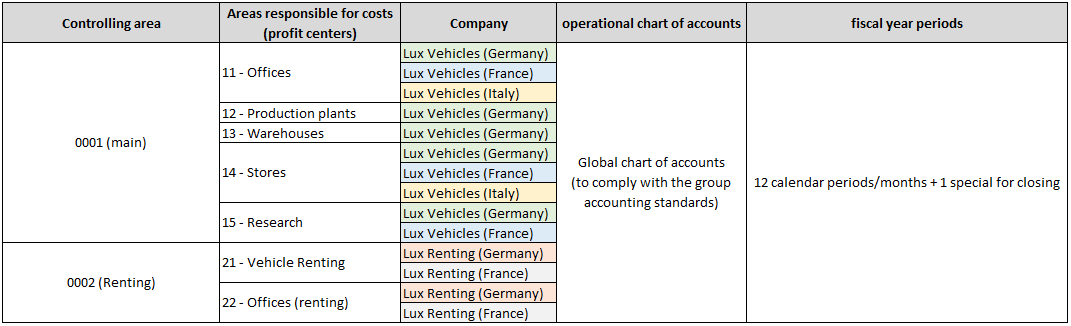
Once you have the answers, you could draw up a proposal for the controlling areas with the assigned companies, areas responsible for costs (profit centers), chart of accounts and fiscal periods.
1.1.2. An example for better understanding.
Let’s supose you are working on a SAP implementation of FI and CO. Go over the following slides for a better understanding of what information you should consider In order to propose a set of controlling areas that could cover the group needs:
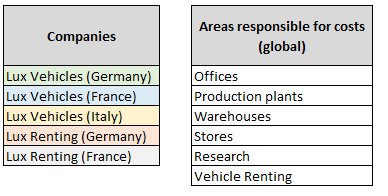
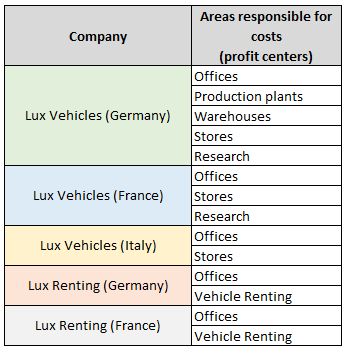
know the companies and which areas
are considered responsible for costs.
applies to every company, and
these are the relations:
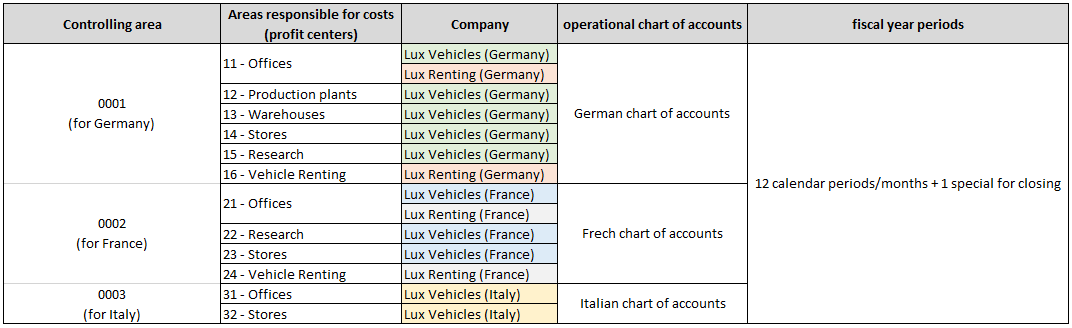
stay that way in SAP. They also states that all companies should operate with 12 calendar periods/months, plus an extra
period at the end of the year for closing activities.
Attending the accountants demands, there must be 3 controlling areas (at least):
accounts, there must be 3 controlling areas. Since all companies work with the same periods, 3 controlling areas will be enough.
controlling area per country.
Furthermore, the cost reporting will not be able to provide the figures of an specific area for the whole group. The reporting will
be available at controlling area level.
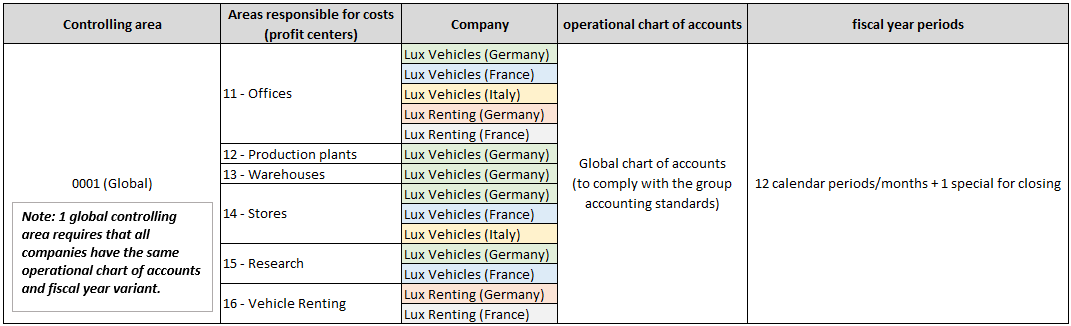
and profit across companies of different countries.
the different areas responsible for costs:
these companies belong to a recent business segment which is managed differently.
This means that a new controlling area needs to be created for those companies, and more profit centers:
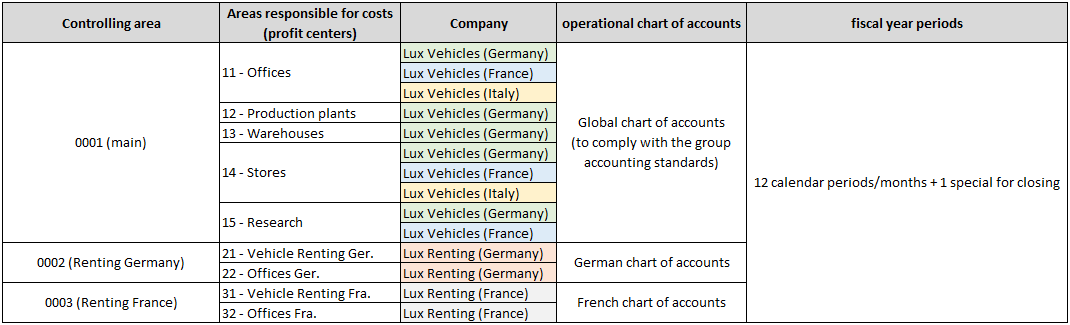
This means that a new controlling area needs to be created, since one controlling area can't have more than one operational
chart of accounts. Besides, more profit centers are required to reflect the areas responsible for costs in the new controlling area:
2. Related customizing #
2.1. Copy an existing controlling area with a company code #
To create a new controlling area you have the option of creating it in combination with an existing company code. Once copied you could create additional company codes and then assign them to the same controlling area.
As an example, in the following video we create a controlling area and 2 company codes following these steps:
- Create a new controlling area and company code by copying an existing controlling area and company code.
- Copy again the company code to create an additional one.
- Check and update the assignment of the new company codes to the new controlling area.
- Update the fiscal year variant and the chart of accounts of the controlling area and company codes.
2.2. Create a new controlling area from scratch #
Besides copying an existing controlling area and company code in one step as seen before, you can create a new controlling area by setting its values manually.
2.2.1. Create a cross-company code controlling area.
As an example, in the following video we create a global (cross-company) controlling area following these steps:
- Create two company codes with the same fiscal year variant and chart of accounts.
- Create a new controlling area for the same fiscal year variant and chart of accounts.
- Assign the two company codes to the new controlling area.
2.2.1. Create a controlling area per company code.
As an example, in the following video we create a controlling area only for the company code with same ID:
- Create a company code.
- Create a new controlling area with the same ID of the company code created.
3. Further steps #
Once the controlling areas have been created, you should assign the company codes you want to be included within the controlling area.
You also may want to continue defining some other controlling objects, such as cost centers or segments.
4. Related objects #
The following objects have been mentioned in this topic and you should consider going over them:
5. Related transactions and apps #
These are some Fiori apps related to this topic:
- Set a controlling area. (OKKS)
These are some transactions codes to access some of the points related to this topic:
EC01
Copy a company code.
V_T001
Edit company code details. (name, address, currency, language)
OX06
Maintain controlling areas: You can change or create new controlling areas.
OX19
Assign company codes to controlling areas.
OKKS
Set a default controlling area.

 English