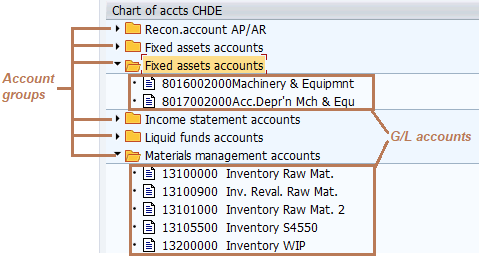
A chart of accounts provide a framework where you define:
- A set of account groups.
- A set of G/L accounts, each one assigned to an “account group”.
Once you define the account groups and G/L accounts you can see the structure of the chart:
When you post an accounting relevant business transaction in a company code, the values of that transaction are saved into G/L accounts that belong to the chart of account assigned to the company code.
1. Related Customizing #
1.1. Basic data of a chart of accounts #
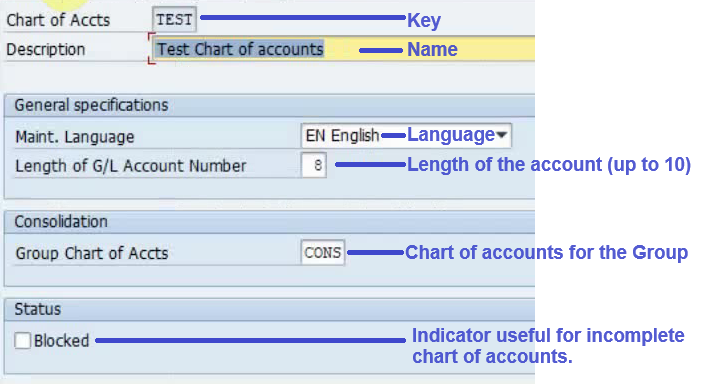
The chart of accounts basic data contains the fields you can see in the following image:
1.2. Steps #
A chart of accounts can be created from scratch. However, it’s recommended to use another chart as a reference. You could follow these steps:
- Display the existing charts of accounts. There are many country specific charts of accounts included in SAP with ID CA*.
- Display the G/L accounts and groups of different charts of accounts, to conclude which one could fit best.
- Create the new chart of accounts using the reference chart.
- Check the new chart of accounts and possible adjustments.
1.3. Steps for creating a CoA using another as a reference #
In the following video you can see the steps for creating a chart of accounts using another as a reference:
2. Chart of accounts types #
You can create charts of accounts for different purposes.
2.1. Operational chart of accounts #
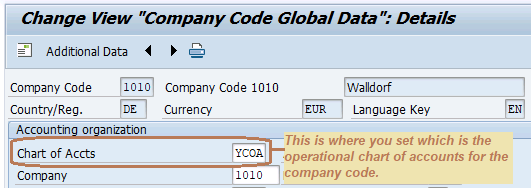
Each company code needs an operational chart of accounts, which contains a set of G/L accounts that can be used when posting accounting documents. Once defined, it can be used in many company codes. See the following explanatory image:
2.2. Country chart of accounts #
The use of an alternative country chart of accounts is optional, since you could comply with the country accounting standards just with the operational chart of accounts assigned to the company code.
However, the organization might have chosen the approach of using a global controlling area to have a cross-company code controlling. This approach entails using the same operational chart of accounts for all the companies involved.
If the involved companies are located in different countries, most likely the single operational chart used will be focused in meeting the group standards, but won’t meet the local standards of each and every country.
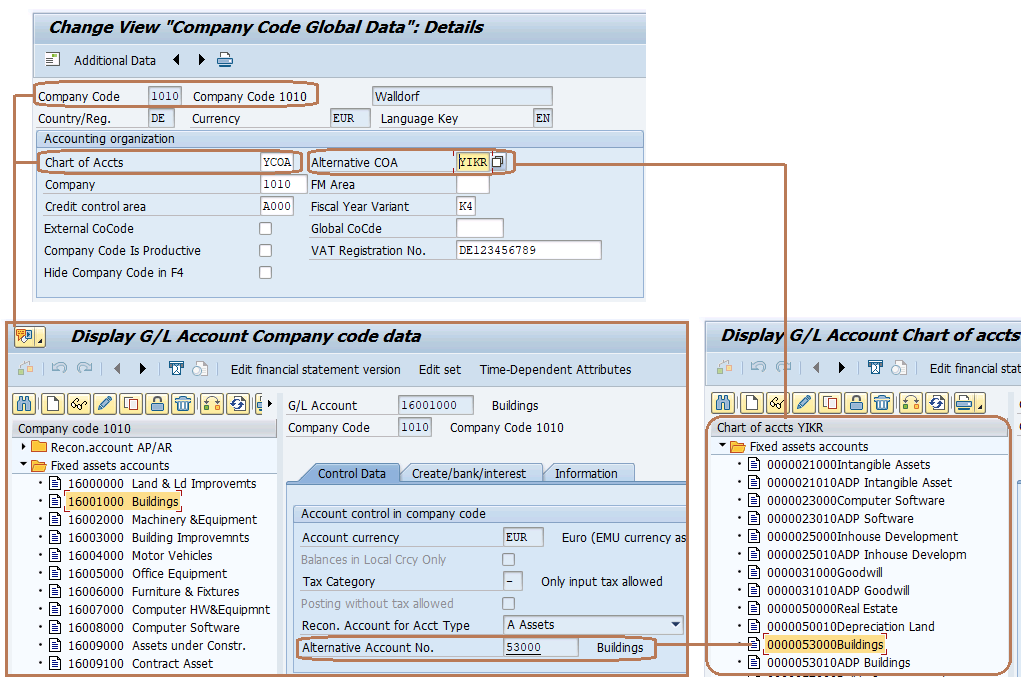
To address this issue and comply with the country accounting standards, you should create a country chart of accounts for each country in the scope, and then you assign it to the involved company codes located in that country. See the following self-explanatory image:
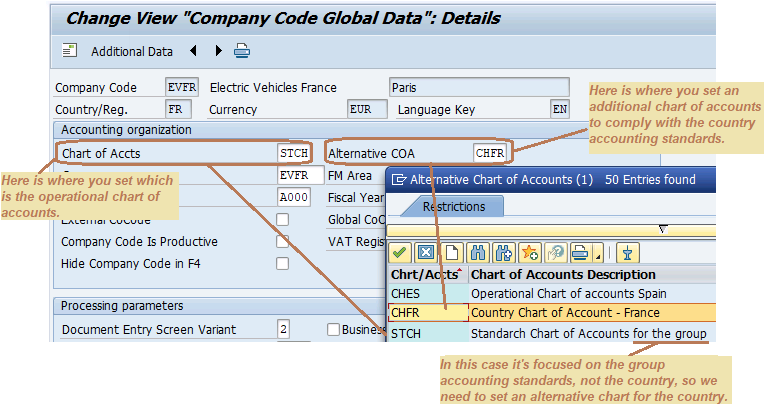 Then you must link every G/L account of the operational chart to the corresponding G/L account of the country chart, at company code level. This is done with the field “Alternative account No.” and each G/L account of the country chart can be assigned only once to a G/L account of the company code. See the following self-explanatory image:
2.3. Group chart of accounts #
This is an optional chart of accounts used to get consolidated financial statements for the group.
There are 2 main reasons to use it:
- To control and get consolidated FI reports of company codes that have different operational charts of accounts.
- To aggregate different operational G/L accounts into other G/L accounts of the group chart.
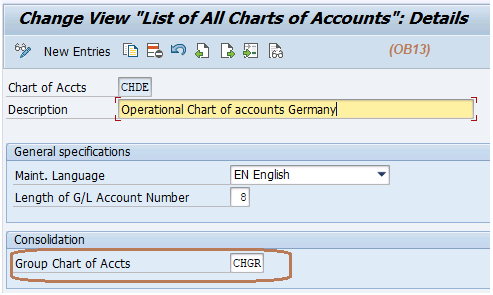
Once the group chart of accounts has been created, you assign it to the operational charts used in the group, such as the following example:
 Then you must link the G/L accounts of the operational chart of accounts to the corresponding G/L account of the group chart. To do that you have to set the “Group account number” field in the G/L account master data, such as the following example:
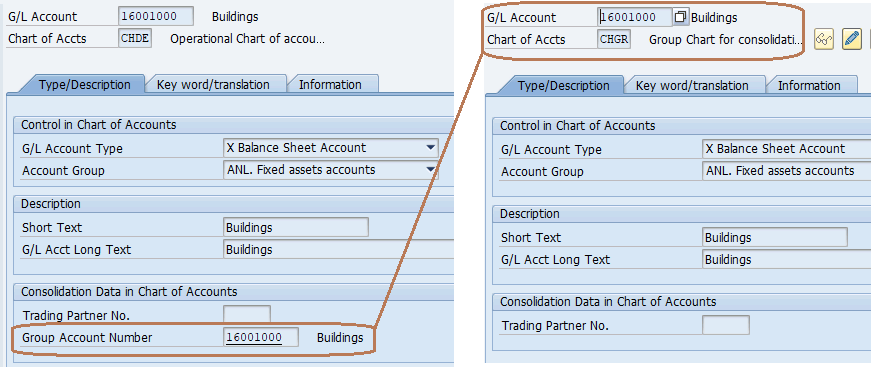 This is usually a n-to-one relationship (N G/L operational accounts – 1 G/L group account).
3. Further steps #
After creating a chart of accounts, no matter whether it’s operational or country or group, you will surely want to get a financial statement report with its accounts.
To achieve that you will also need to create a financial statement version for each chart created.
4. Related objects #
The following objects have been mentioned in this topic and you should consider going over them:
5. Practical examples #
5.1. Operational charts for each country and a group chart #
This approcach gives priority to comply with the country accounting standards. The group accounting requirements are met with the use of an additional group chart. Therefore, in order to meet the country regulations, there is an operational chart for each country where the group operates.
Because of that, a global controlling area can’t be used, as it would require that all companies have the same operational chart and fiscal year variant.
As an example of this approach, in the following video we create 2 companies located in Germany and Spain following these steps:
- Create 1 operational chart for Spain, 1 for Germany, and 1 group chart.
- Link the new operational charts to the group chart.
- Check the link between a G/L account of the operational chart and the group chart.
- Create a company and company code for Germany and another for Spain.
- Link the company codes to the corresponding operational chart.
- Create the controlling area for each company code created.
- Assign each company code to the corresponding company.
- Assign each company code to the corresponding controlling area.
- Create a FI statement verion for an operational chart.
5.2. Same global operational chart in different countries. #
This approcach is focused in having just 1 global controlling area for all the companies of the group, having the same operational chart of accounts although they are from different countries. In order to meet the country accounting requirements, an additional country chart of accounts is required for each country.
As an example of this approach, in the following video we create 2 companies located in France and Italy following these steps:
- Create a global chart of accounts for the group.
- Create a chart of accounts to comply with the french accounting standards.
- Create as well a chart of accounts to comply with the italian accounting standards.
- Ensure the charts created have been modified to comply with the group and country regulations.
- Check there’s no group chart of accounts in the global operational chart.
- Check there’s no group chart of accounts in the country charts.
- Create a global controlling area.
- Create the frech company.
- Create the italian company.
- Create FI statement versions.
6. Related transactions and apps #
These are some Fiori apps related to this topic:
- Manage Chart of Accounts
These are some transactions codes to access some of the points related to this topic:
- OBY2
Copy all GL accounts from one company to another.
- OBY7
Copy a Chart of accounts and its G/L accounts.
- OB_GLACC01
Create G/L accounts with reference.
It enables you to copy only specific GL accounts from other company to your target company code and let you make some adjustments prior creation.
- OBD4
Define G/L account groups within a chart of accounts.
- OB13
Edit chart of account list.
- OB58
Create/Edit Financial Statement version
account.
- EC01
Copy a company code.
- V_T001
Edit some general company code data (name, address, currency, language).
- OX06
Maintain controlling areas.
- OX19
Assign a company code to a controlling area.
- FS00
Edit and copy G/L accounts centrally (chart of accounts segment and company code segment).
- FSP0
Edit and copy G/L accounts (chart of accounts segment only).
- FSS0
Edit and copy G/L accounts (company code segment only). .
- OBR1
Reset transaction data of comp.code and controlling area. It might be used to change the chart of accounts of a company code.
- OBR2
Delete some master data (customers, vendors, G/L accounts) at company code level or general level.
It’s used to delete the G/L accounts at company code level when we’ve just created that company but we want to change the chart of accounts used.

 English