When you post an accounting relevant business transaction in a company code, the values of that transaction are saved into G/L accounts that belong to the chart of accounts assigned to the company code.
Each G/L account is defined just once at chart of accounts level. It must be also defined at company code level before posting a transaction to that G/L account within the company. You must define the G/L account for each company code that uses the same chart of accounts and needs to post values into that account.
Since all accounting relevant business transactions are posted into G/L accounts, these accounts provide a comprehensive picture of the company accounting situation.
General Ledger account master data has 2 different segments where you can define specific data for the chart of accounts and for the company code.
1. Fields in the chart of accounts segment #
When you create a chart of accounts using another as a reference, all G/L accounts are copied including the fields of the chart of accounts segment.
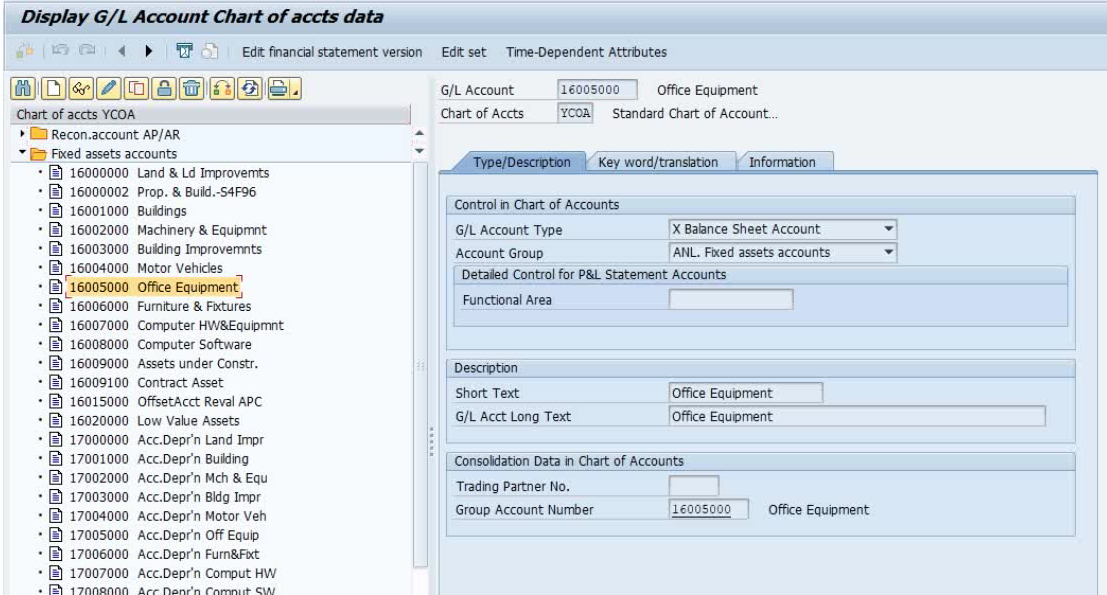
1.1. Control – G/L account type #
You have to choose between one of these account types:
- (P) Primary cost or revenue.
These accounts are used in FI and CO. They appear in the income statement and reflect operating expenses or revenue. This type requires to set the controlling data tab of the G/L account master data at company code level.
- (S) Secondary costs.
These accounts are only used in CO. They appear in the Income Statement and reflect costs that result from the flow of costs within the organization.
An example of this kind of account is the one that represents the “cost of goods sold” when goods are issued in the order-to-cash process (sales).
This type also requires to set the controlling data tab at company code level.
- (X) Balance-Sheet.
Use this type for accounts that represent items that should appear in the balance sheet. These are assets, equities and liabilities. The balance of these accounts are carried forward (to the next year) as part of the closing activities of the fiscal year-end process.
- (C) Cash.
This type is recommended to be used for bank reconciliation accounts, assigned to house bank accounts to which payment transactions are posted.
- (N) Non-operating expense or income.
These accounts are used only in FI, they appear in the income statement and reflect expenses or gains that result from activities that are not related to the main purpose of the company. For instance, a manufacturing company can have some gains from bank deposits or investment funds.
1.2. Control – Account Group #
The account group is used to organize the G/L accounts, control the appearance of the G/L account master data (company code segment), and its number range.
1.3. Control – P&L Statement account type #
One closing activity of the year in G/L accounting is the “Balance Carryforward”. If you want the balance of a cost/expense account of the P&L statement to be carried forward to the “retained earnings account” for the following year, you must set the field “P&L Statement account type”.
1.4. Control – Functional area #
A functional area represents an origin of costs by its function within the company. Funcional areas are needed when the company chooses an approach for the creation of the income statement (P&L) called “cost-of-sales accounting”.
Read more about functional areas.
1.5. Consolidation – Group account number #
The group account number links the G/L accounts of the operational chart of accounts to the corresponding G/L account of the group chart of accounts. It’s used for consolidation.
 This is usually a n-to-one relationship (N G/L operational accounts – 1 G/L group account).
1.6. Consolidation – Trading partner #
The trading partner is used for consolidation purposes. It can be filled with the ID of a company within the group. This company must have been defined in the FI enterprise structure in customzing.
When you set a company ID for this field of the G/L account, that company ID will appear in the items posted for the G/L account.
2. Fields in the company code segment #
In the company code segment you have the following fields.
2.1. Control – Currency #
If the currency set in the company code segment of a G/L account master data is the same as the company code currency (set by default), then you can use any currency when posting that account. The amount is converted into the local currency.
If the curreny set in the company code segment of a G/L account is different from the company code currency, you can only post in that currency.
2.2. Control – Tax category #
The use of this field depends on whether the G/L account represents taxes or not.
If it represents a tax, use this field to define whether it’s an input or output tax:
| Tax Category | Description |
|---|---|
| < | Input Tax Account |
| > | Output Tax Account |
| Tax Category | Description |
|---|---|
| Non tax-relevant | |
| - | It requires an input tax code. |
| + | It requires an output tax code. |
| * | It requires any tax code. |
| XX | It requires the tax code XX specifically. |
2.3. Control – Reconciliation account for account type #
This field specifies the subledger for which the G/L account can be used as a reconciliation account. You can choose between:
- Accounts payable (K).
- Accounts receivable (D).
- Asset accounting (A).
- Contract accounting (V).
2.4. Control – Alternative account number #
This is the corresponding country G/L account when there’s a country chart of accounts assigned to the company code. Each G/L account of the country chart can be assigned only once. See the following self-explanatory image:

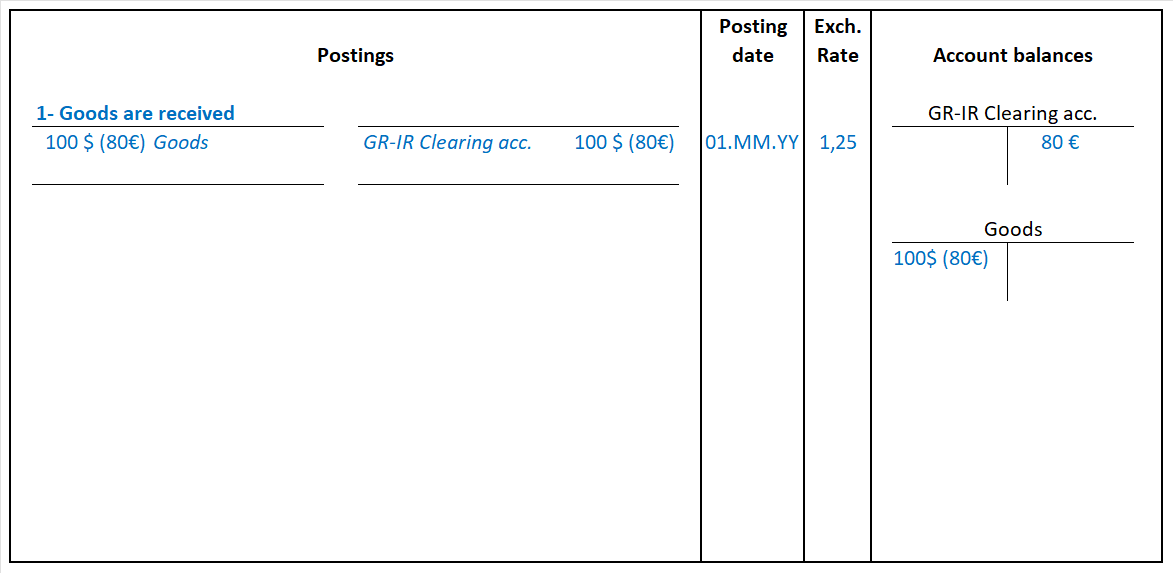
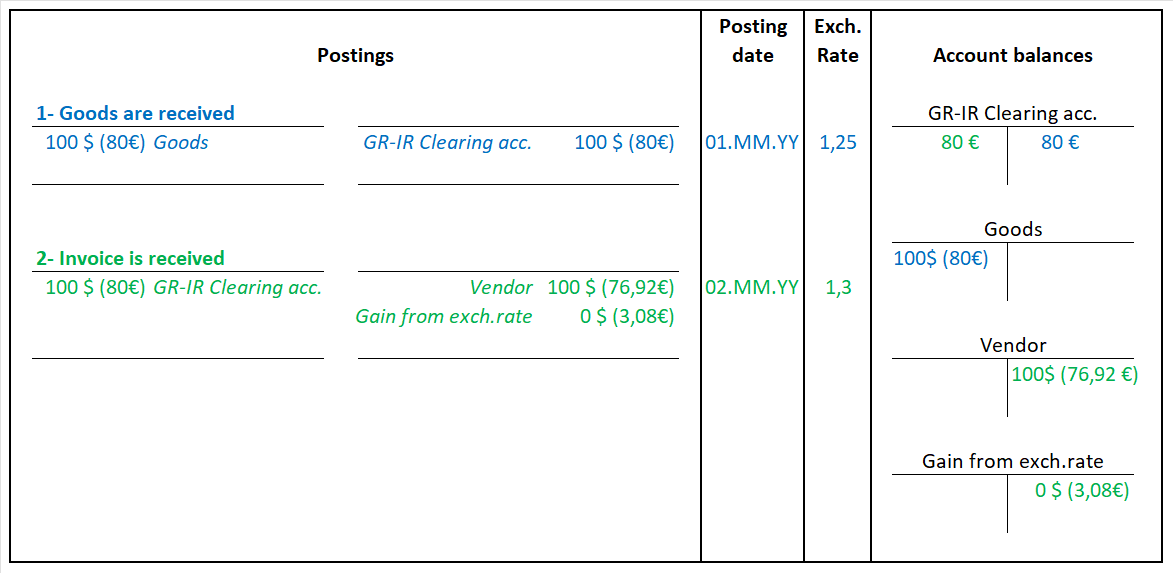
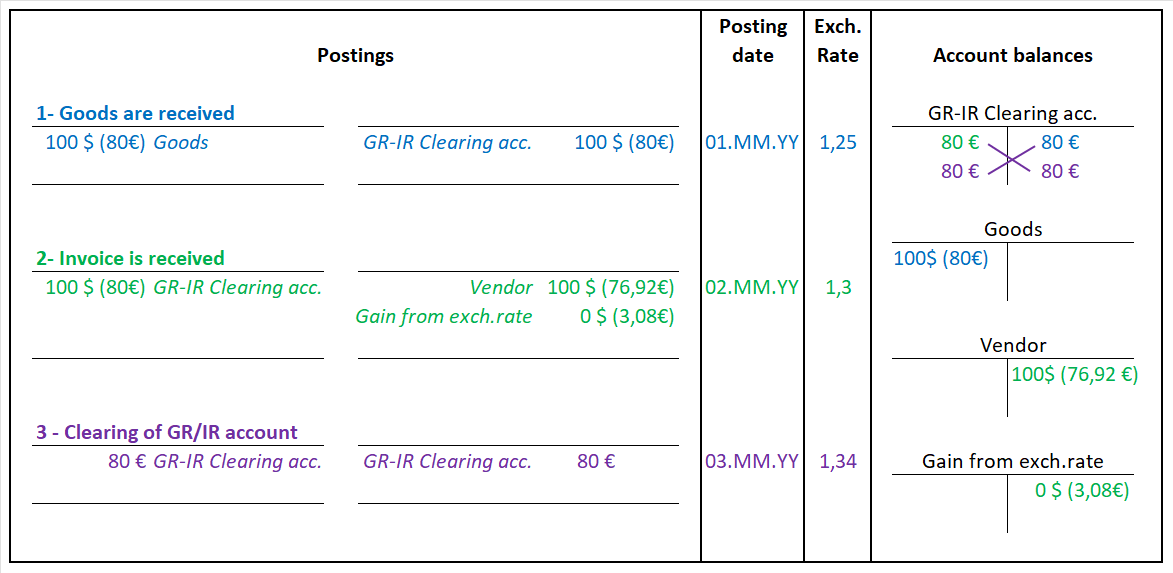
2.5. Control – Balances in local currency only #
This checkbox is intended for intermediary accounts that have to be cleared without beeing affected by any change in the exchange rate of the currency used in the business transactions. It must be set for accounts such as:
- GR/IR clearing accounts.
- Bank clearing accounts.
- Cash discount accounts.
For better understanding, Let’s see an example of the first postings of the purchase-to-pay process (goods and invoice receipt):
2.6. Control – Tolerance group #
The tolerance group used in the G/L account controls the automatic clearing of an open item with that G/L account.
In the tolerance group you set the permitted payment differences so that an automatic clearing between the item and a payment can be done.
2.7. Account management – Sort key #
With the sort key you choose a rule which points to a field or combination of fields used to automatically fillthe assignment field when posting FI relevant transactions:
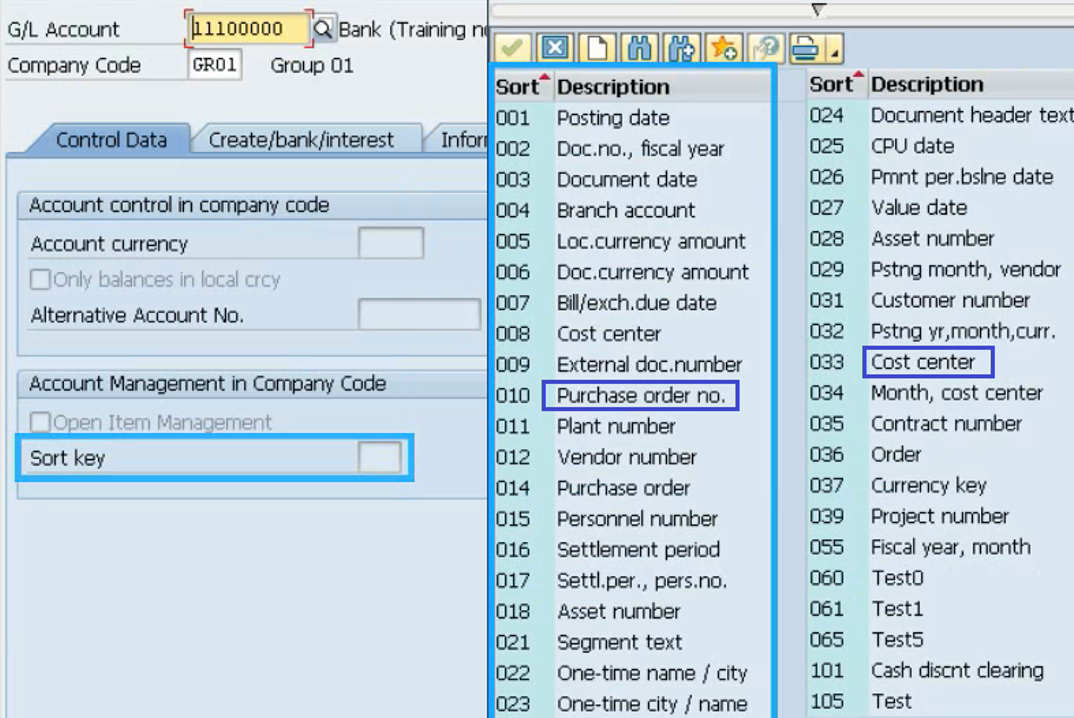
The value of this field can be used for clearing open items or line item sorting.
2.8. Account management – Open item management indicator #
You set this indicator to have 2 states (open or cleared) per item posted in the account. Once activated in the account, the account balance must be zero to deactivate it.
You should set this indicator for these G/L accounts:
- Bank clearing accounts.
- Goods receipt / Invoice receipt clearing accounts.
- Salary clearing accounts.
2.9. Control of document creation – Field status group #
With the field status group you can change the behaviour of the item fields when posting. This means that you can hide, show or set a field mandatory for entry on screen. Different status groups for G/L accounts can be set to fit different requirements.
2.10. Cost element category #
The cost element category field is used to determine which cost elements of controlling (CO) can be used for which business transaction. You can choose different categories depending on the account type. Watch the following video for more detail:
3. Go over a G/L account #
In the following video we’ll have a look at most of the fields we’ve seen so far, checking the standard documentation available in SAP GUI.
4. Related topics #
The following topics have been mentioned in this topic and you should consider going over them:
- Company code
- Chart of accounts.
- Balance Sheet.
- Income Statement.
- Balance carry forward
- Account group.
- Tolerance group.
- Field status group.
5. Related transactions and apps #
Related Fiori apps:
- Balance Sheet/Income Statement.
- Manage Chart of Accounts.
- Manage G/L Master Records.
These are some related transactions of the objects discussed:
| Transaction | Description |
|---|---|
| FS00 | Edit, create, copy or display a G/L account centrally |
| FSS0 | Same as FS00 but only for the company code segment. |
| FSP0 | Same as FS00 but only for the chart of accounts segment. |
| OBY2 | Copy all G/L accounts from a company |
| OB13 | List and edit charts of accounts |
| V_T001 | Edit company code |

 English