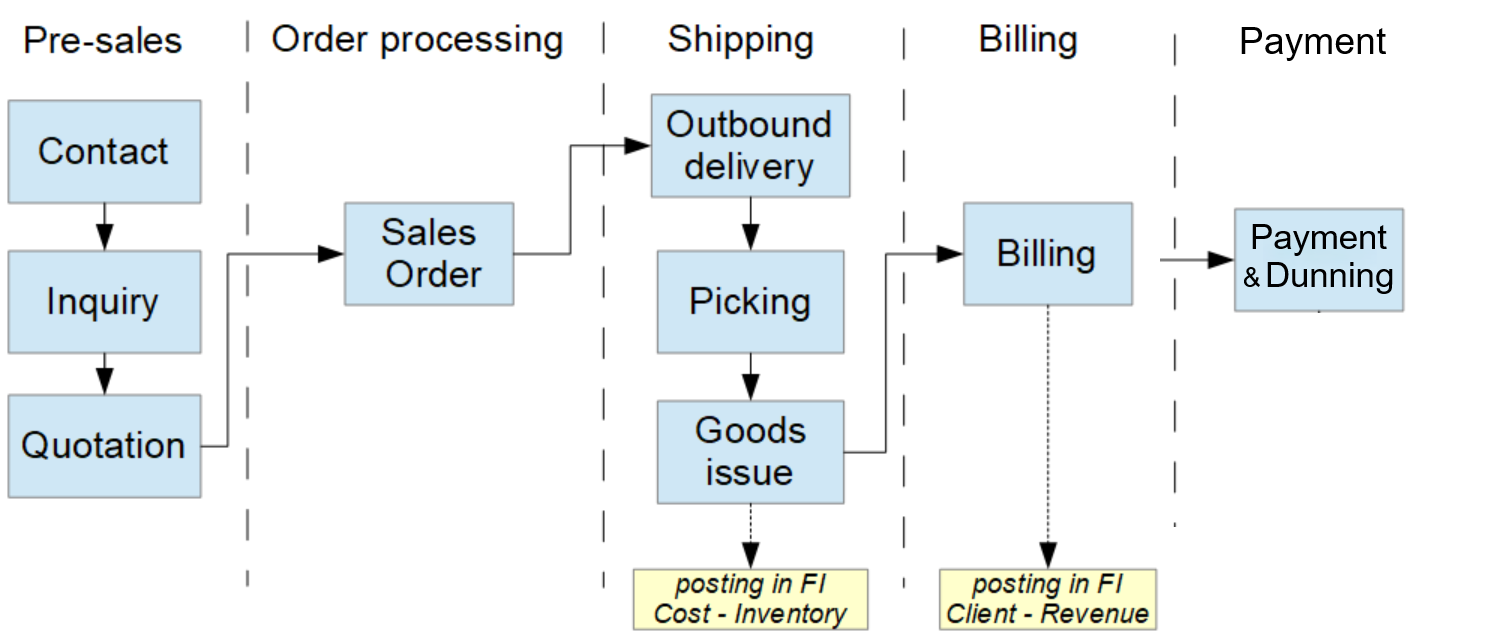
Sales order process is called order-to-cash and consist of different steps or activities:
1. Pre-sales activities #
Pre-sales activities are:
- Customer contacts the company.
- Customer makes an inquiry.
- The company sends a quotation to the customer.
2. Order processing #
In the order processing the sales order is created for the customer (VA01 trans.). This order has items requested, pricing and delivery conditions, which includes the delivery date.
The sales order items can be goods or services. Goods can be:
- Goods from stock.
- Goods from suppliers.
- Goods the company has to manufacture.
3. Shipping #
In order to meet the delivery date, goods are taken or picked from the warehouse. These are the main steps:
- Create the outbound delivery selecting the sales order and the delivery date (VL01N trans).
- Create a transfer order to generate the pick order. (VL02N trans.)
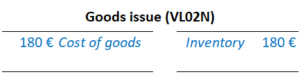
- Goods to be delivered are issued in a document posted in MM, and a FI document. (VL02N trans.)
4. Billing #
When a billing document is created, a printed invoice (pdf or paper) is sent to the client. At the same time, a FI document is posted for that invoice.
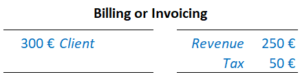
Once the invoice is posted, the payment will be processed, which means a new FI posting that will clear the client open item.
5. Related transactions and apps #
| Trans. or app | Description or relevant to note |
|---|---|
| VA01 | Create a sales order |
| VA02 | Use it to schedule the requested delivery of each item of the sales order. Also use it for invoicing. |
| VL01N | Create the outbound delivery, usually in the same delivery date or the day before. |
| VL02N | Use it to create a transfer order / pick order, so that the goods can be withdrawn, and to create the "Goods Issue" document in MM. |
| VF01 | Use it for billing/invoicing. |

 English