Tolerance groups are used to establish permitted payment difference limits for automatic postings when entering incoming payments. There are three types of tolerance groups that can be defined: for employees, for G/L accounts, and for customers or vendors.
1. Tolerance groups for employees #
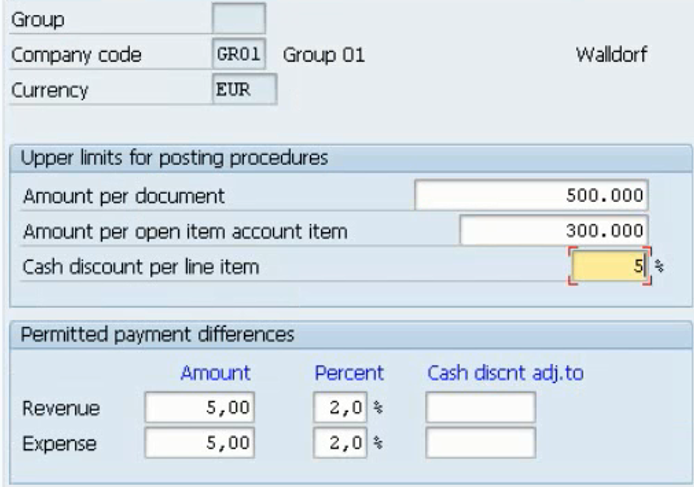
In the tolerance group for users (OBA4) you can define:
- The upper amount limits for posting transactions. Limits can be set as an amount per document, per open item, and as a cash discount % per item.
- The maximum amount or pecentage that can be accepted and posted automatically as a payment difference (overpayment or underpayment) or as a cash discount adjustment.
There’s a blank tolerance group that applies to every user that does not have other specific tolerance group.
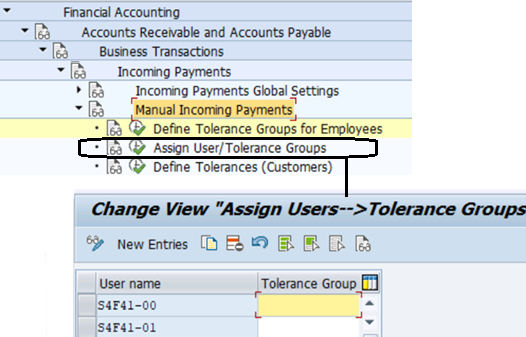
 Different tolerance groups can be created and assigned to the employee users.
2. Tolerance groups for G/L accounts #
The G/L account tolerance group is used for controlling tolerances:
- You can set which is the upper amount for a G/L account when posting.
- You can set the permitted difference when clearing G/L account open items.
Create as many tolerance groups as needed in OBA0. Then they can be assigned to the G/L accounts that need this kind of control.
3. Tolerance groups for customers (or vendors) #
In the transaction OBA3 you define customer/vendor tolerance groups. They provides the upper limits to be used when dealing with differences in payments received, postings and clearing transactions. There are differente areas you can define:
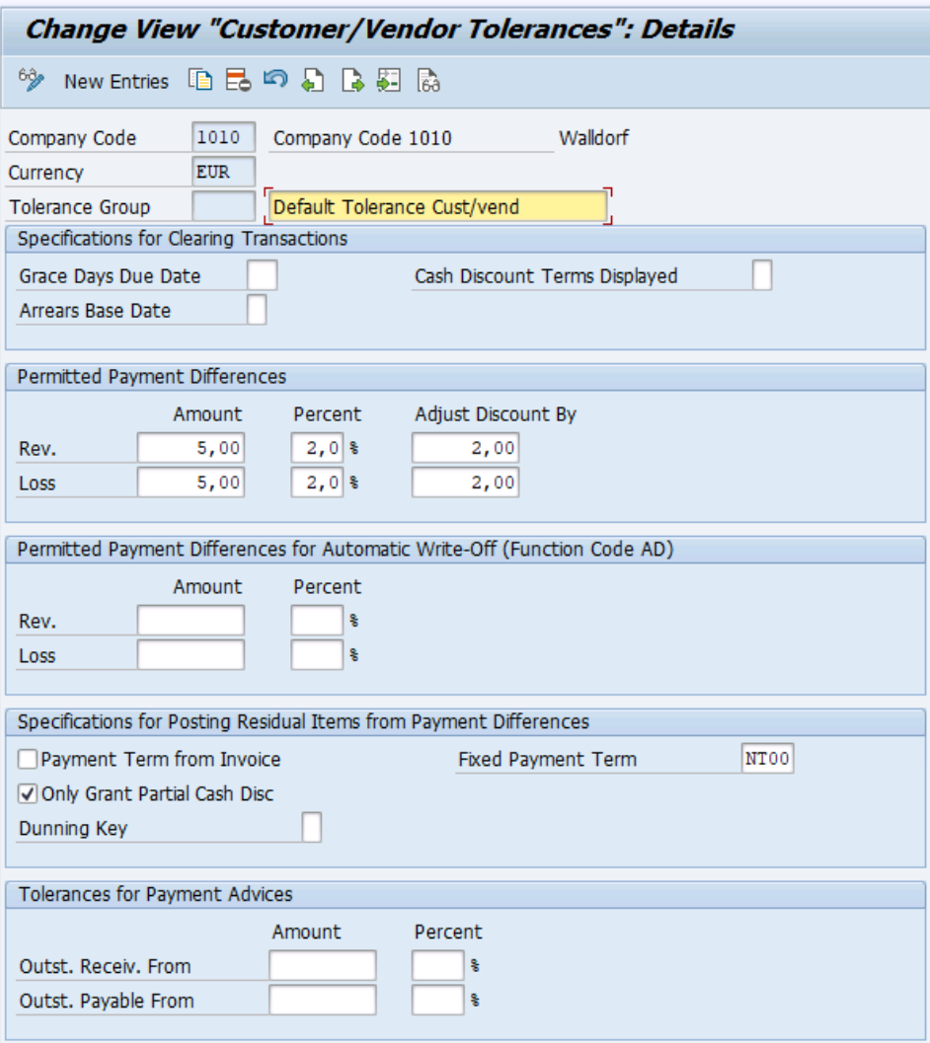
Once tolerance groups are defined you assign them to the customer/vendor master data.
3.1 For clearing transactions #
We now focus on the fields of this area:
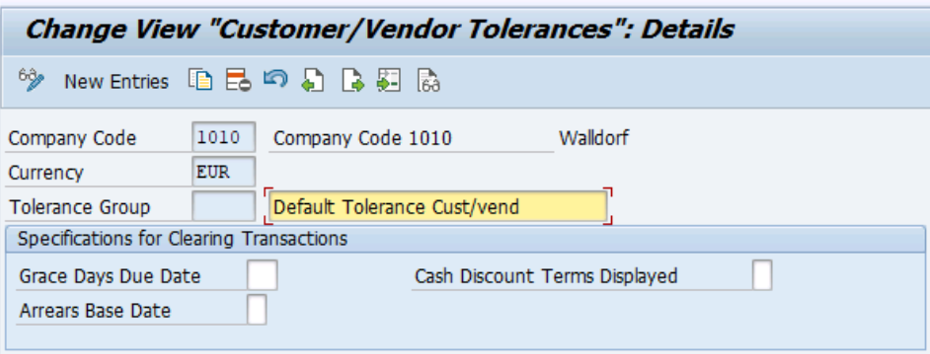
Grace days are the number of days that the payment deadline can be exceeded.
Arrears base date is used to specify whether the grace days are counted from the document date or value date of the item.
Leave the Cash discount term empty or with 0 in order to post the incoming payment with the cash discount according to the term of payment valid at the clearing date. You can also set a specific cash discount (term 1 or 2 of the terms of payment).
3.2 Permitted Payment Differences for manual payments #
There could be payment differences when manual posting an incoming payment (F-28), and in this area you can configure when and how SAP must accept the differences and post the payment automatically.
 See more details and video examples in the handling payment differences topic.
3.3 Permitted Payment Differences for automatic clearing #
SAP has automatic fields separated from manual for better risk management, since companies usually allow smaller amounts for automatic clearing processes.
In this other area you can set differences for the automatic clearing process (F.13) or any clearing process with function code AD:

This settings will take effect when SAP detects an item posted (user not involved) that could match the item of an invoice with an acceptable difference.
If the difference is higher than the permited amount or percentage, the automatic clearing won’t be applied and items will remain open.
3.4 For posting residual Items #
This area controls how residual items are posted and cleared:
 A residual item is a way of posting payments with differences out of tolerance. The original invoice item is cleared, and a new residual item is posted for the difference.
You can post the residual item with the same payment term of the original invoice, or you can use a fixed payment term. If none of these 2 fields are set, then the payment term used will be one available in the customer/vendor master data.
You can also specify a dunning level for the residual posted item, which can be useful to set the maximum level, or to suppress dunning for small amounts.
The checkbox “Only grant partial cash discount” is set to avoid the calculation of any cash discount when clearing the residual item with an additional payment posted afterwards.
3.5 Tolerances for Payment Advices #
A payment advice is the information that the payer sends with details of the payment (paid amount, invoices referenced, discounts applied). This information is usually received from the bank (EBS).
These fields are used when the payment advice is received by automatic processing (EBS, Lockbox) and open items are cleared accordingly. The amount defines de maximum difference between the paid amount and the sum of open items selected in the clearing process:
 The first pair of fields are used when the payment received falls short of the selected open items. This is an underpayment, and a residual item is posted.
The second pair are used when the payment exceeds the selected open items (overpayment) and a payable item is posted automatically.
4. Related transactions #
| Transaction | Description |
|---|---|
| OBA0 | Tolerance Group for G/L account |
| OBA3 | Tolerance Group for customer or vendor |
| OBA4 | Tolerance Group for user or employees |

 English