A functional area represents an origin of costs by its business function within the company.
1. Related Customizing #
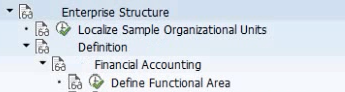
Go to the enterprise structure point to define funcional areas:
2. Typical functional areas #
Typical functional areas are:
- Sales & Distribution.
- Production.
- Marketing.
- Administration.
- Research & Development.
3. Usage #
The funcional area is stored in the Universal Journal (ACDOCA), and it’s optional. However, It is mandatory if the company chooses an approach for the creation of the income statement (P&L) called “cost-of-sales accounting”. In this case, overhead costs are reported according to their funcional areas.
This approach groups the costs of sales by their functional area, and that’s why the cost postings should derive a correct functional area. There are different options to achieve this. One option is creating different G/L accounts for different functional areas and set the correct functional area at G/L account level.
4. Derive the functional area #
4.1. Items for P&L accounts #
If all postings of a G/L account are going to be assigned to the same functional area, assign the “functional area” to the G/L master account.
If that’s NOT the case, to have the functional area at line item level of a posting you can set its a value while posting, or deriving it from a CO object (cost center, internal order) or from a substitution.
The priority for the functional area is:
- Manual entry in the document.
- Substitution.
- G/L account master record,
- CO object: Cost center.
- CO Object: Internal order / WBS
4.2. Items for balance sheet accounts #
To make possible SAP enrich the balance items with the different functional areas derived, “Document Splitting” has to be configured properly.

 English