Incoming payments are usually payments received by clients in order to pay for the goods or services received. The company expects these payments to be done on the due date that appears on the invoice sent to the client. This payment would be the last step of the Order-To-Cash process.
1. Aim of the incoming payment #
The aim of incoming payments is to clear the debit balance of clients, who have received invoices and want to pay off their debt.
Let’s go over a simple example with three main steps:
- An invoice has been posted for a new client, and as a result, his account has a debit balance.
- After receiving the invoice, the client issues a bank transfer in order to pay it in full.
- The following day, an accountant finds the payment in the company bank statement and registers it into the system, clearing the client debt and his balance account.
Let’s see the accounting movements:
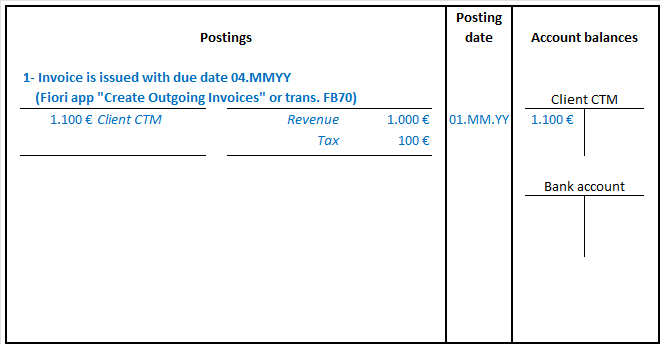
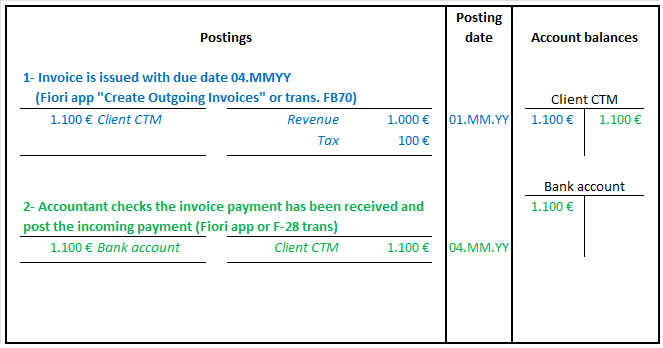
Instead of checking the bank statement and posting the incoming payment manually, SAP can be set up to receive an Electronic Bank Statement (EBS) and perform postings automatically for each item received.
2. Handle payment differences #
Ideally, the invoiced amount will be the amount of the payment received. However, this is not always the case. Sometimes there is an agreement in certain payment terms that includes a cash discount, and although the payed amount is lower, it still complies with the terms agreed.
On the other hand, there might be other reasons that make a client pay a lower amount, and you should configure SAP for handling the payment differences.
For further information check the “handle the incoming payment differences” topic.
3. Practical examples #
In the following video you can see a basic example of the incoming payment process in SAP Fiori.
4. Related transactions and apps #
Check the following Fiori apps available:
- Create Outgoing Invoices.
- Post incoming payment.
Check the following transactions available in the SAP GUI:
| Transaction / App | Description |
|---|---|
| FB70 | Create outgoing invoices |
| F-28 | Post incoming payments |

 English